
Deliver hyperpersonalized viewer experiences with an agentic AI movie assistant using Amazon Nova Sonic 2.0Recommendation systems are the backbone of modern media streaming services, shaping how users discover content. Traditional machine learning (ML) systems use collaborative or content-based filtering to predict content preferences. However, they often miss context-dependent needs, such as time of the day, mood, or social settings. For example, after watching ‘The Shawshank Redemption,’ a system might suggest more prison dramas, ignoring that the user might want something lighter to unwind. A hybrid approach addresses this gap by combining traditional machine learning pattern-recognition capabilities with generative AI’s contextual understanding and conversational abilities. Agentic AI takes this further by engaging users through dynamic dialogue and reasoning about viewing context. These recommendation agents synthesize information from multiple sources—plot summaries, reviews, viewing history—and incorporate real-time user feedback. Users can ask about specific scenes or themes, and the agent provides contextual explanations. This creates an experience like consulting a knowledgeable curator who understands both content and individual preferences.
In this post, we walk through two use cases that help enhance the user viewing experience. First, imagine telling the AI agent that you want something fun after a long day, and getting recommendations that match how you feel and not only what you’ve watched before. Second, picture pausing midmovie to ask: “who is that actor?” or “summarize what just happened?” and getting an instant answer. Building this conversational assistant requires orchestrating real-time speech processing, context management, tool invocation, and curated responses. This is a complex challenge that we can help streamline using agentic AI tools and frameworks including Strands Agents SDK, Amazon Bedrock AgentCore, and Amazon Nova Sonic 2.0. This agentic AI system uses a Model Context Protocol (MCP) to deliver a personal entertainment concierge that understands user preferences through natural dialogue. We share the code samples for this application in the GitHub repository.
Architecture
The solution architecture focuses on 1/ movie recommendation and 2/ movie scene analysis. We elaborate on both these flows in greater detail in the subsequent sections of this post.
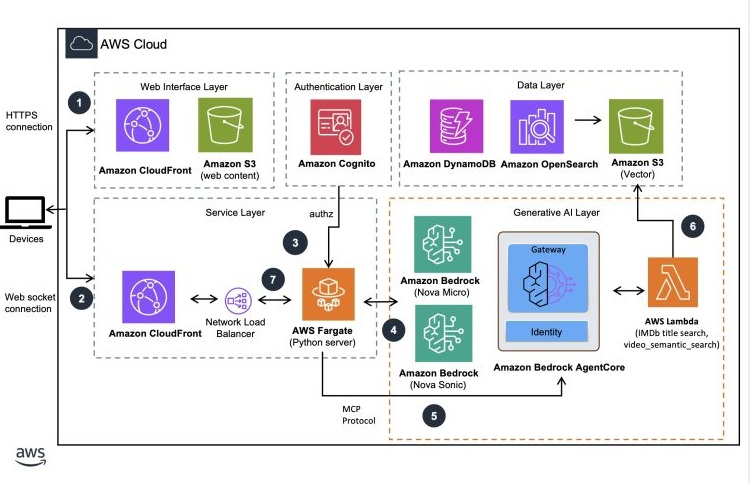
User interaction workflow
- User authenticates with the web UI that’s hosted as a static website on Amazon Simple Storage Service (Amazon S3) and serves through Amazon CloudFront with Amazon Cognito.
- A WebSocket connection is established from the client to the server hosted in AWS Fargate exposed using an Amazon CloudFront endpoint. The session communications between client and servers are performed through this connection. WebSocket connections require JWT token validation at connection time. The session communications between client and servers are performed through this connection.
- AWS Fargate server validates the incoming connection, instantiates a session with Amazon Nova Sonic 2.0 for bidirectional streaming communications with the server.
- User voice commands are sent to the Amazon Nova Sonic model through the established WebSocket connection. The Fargate container uses a bidirectional Smithy streaming RPC protocol to communicate with the Nova Sonic model. Responses from the model are processed by the container.
- AWS Fargate container manages the tool events from Nova Sonic and initiates an agentic workflow by using the MCP server to process user requests. Amazon Bedrock AgentCore Gateway helps transform AWS Lambda functions into MCP-compatible tools for the agent.
- AWS Lambda uses Amazon Nova understanding models (micro, lite, pro) for processing, with OpenSearch and S3 Vector serving as the semantic search and storage layers. Results are returned to the server through Amazon Bedrock AgentCore Gateway.
- AWS Fargate sends the response to Amazon Nova Sonic for the final voice response formulation. The voice response is streamed to the web UI through the WebSocket connection.
Natural speech user interface
We use Amazon Nova Sonic 2.0, our latest speech-to-speech model that delivers real-time, human-like voice conversations with low latency. This provides a user experience with fluid exchanges that feel genuinely conversational, helping transform AI interactions from rigid Q&A sessions into dynamic, productive dialogues. With asynchronous support for task completion, you can maintain fluid dialogue while processing complex tasks in the background during active conversations. Finally, Nova Sonic 2.0 natively supports both text and streaming speech inputs, giving you flexibility in how you interact with the AI assistant. You can also define the personality of the AI assistant by providing a system prompt at the beginning of the conversation. The ability to control the assistant’s personality makes sure that responses can stay on-brand and within appropriate boundaries, helping to protect your service’s reputation. We share some best practices on creating effective system prompts with Nova Sonic to help maximize the results. The complete system prompt defined in our solution can be found in this module.
Preprocessing workflow
The following diagram illustrates the offline processes that generate key insights from title catalog data, movie scenes, and movie scripts. These insights support the movie personalization and scene analysis workflows in our solution and serve as the foundational knowledge for the movie assistant agent.
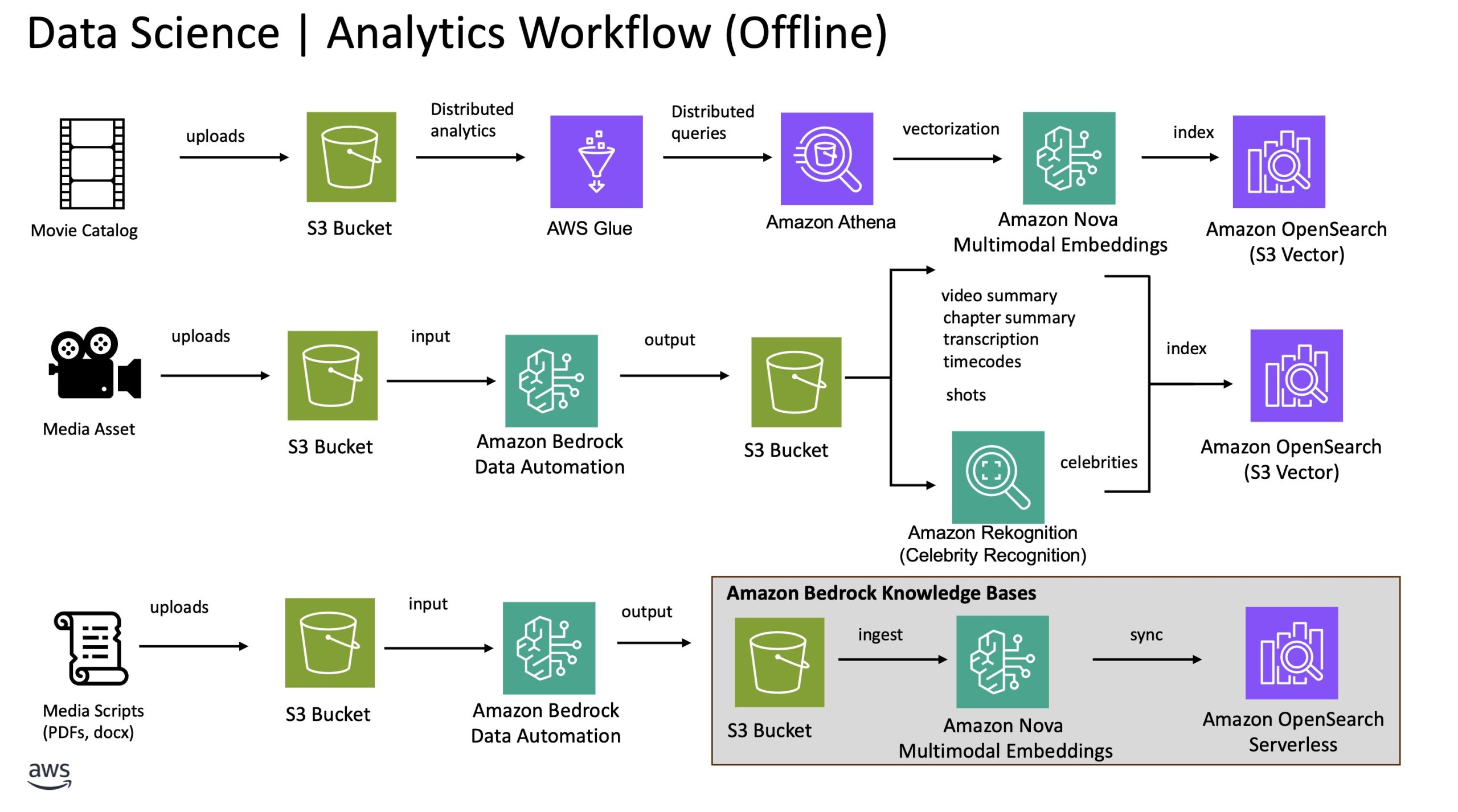
To showcase the movie personalization feature, we created 500 sample movies to represent the catalog. The movie’s metadata, including title, genre, and description are converted into an embedding, a numerical representation that captures its meaning. This enables semantic search, where queries are matched based on meaning rather than exact keywords. Other metadata including cast members and released dates are stored as attributes in the same index within an Amazon OpenSearch Service cluster with Amazon Simple Storage Service (Amazon S3) Vector as the storage layer. This index is used to power the hybrid and search for movie recommendation workflow described in the previous section.
To enable the scene analysis feature with high accuracy, we split the processing of the media content into two steps. First, we use Amazon Bedrock Data Automation to extract key insights from the video content. The insights include chapter level summary and the corresponding timecodes, transcriptions, audio segments and more. Additionally, we use the celebrity recognition feature in Amazon Rekognition to identify celebrities appearing in the chapters. Second, we use the embeddings generated from the movie scripts extracted through Amazon Bedrock Data Automation for semantic similarity search. These embeddings are the foundation for which the agent uses to find the most semantically similar moments within the script that match the given movie scene summary. We provide more details on this in the later section.
Movie recommendation flow
The following user interaction demonstrates a content personalization workflow in more detail:

Referencing the previous diagram, when a user asks for a movie recommendation, Amazon Nova Sonic recognizes the user’s intent and triggers the appropriate tool to handle the movie recommendation requests. A Lambda function is triggered using AgentCore Gateway to process the request. The function first retrieves the user’s affinity from the DynamoDB table to better understand the user’s profile. This table represents a personalized profile of each user’s preferences, tastes, and viewing patterns. For instance, if the user has watched the Harry Potter series in the past, the system could assign higher affinity towards fantasy and adventure genres. Combining user affinity and the user query, we process the request in multiple large language model (LLM) calls chained in a sequence. First, an LLM classifies the type of search based on the intent of the query. The classification helps determine the appropriate search query to use. For instance, general movie recommendations, direct movie search, movie quotes, or something completely unrelated to movies. We use Amazon Nova Micro for this prompt given its price performance benefit. The prompt that extracts the intent classification, and other metadata can be found in this code sample.
Next, we send the user query to another LLM to rewrite it to provide a richer, more relevant search query that can be used for semantic search against the movie catalog data. For instance, the following user query:
I am looking for some fun movies, what do you recommend?
will be rewritten to:
Fun and entertaining movies that offer humor, excitement, or enjoyable storytelling
Through our internal testing, we found that using Amazon Nova Lite produced the structured response in the most cost optimized manner. The complete query rewrite prompt snippet is found in the following code sample.
The output from the query to rewrite and intent classification prompts are used as parameters to an Amazon OpenSearch Service search query. We convert the rewritten query into a 1024-dimension vector using Nova embeddings for semantic search. Additionally, our search query incorporates recency and popularity boosting to elevate newer, top performing shows in the recommendation rankings. An example search query snippet can found in the _get_titles_from_query_v2 function in the following OpenSearch module.
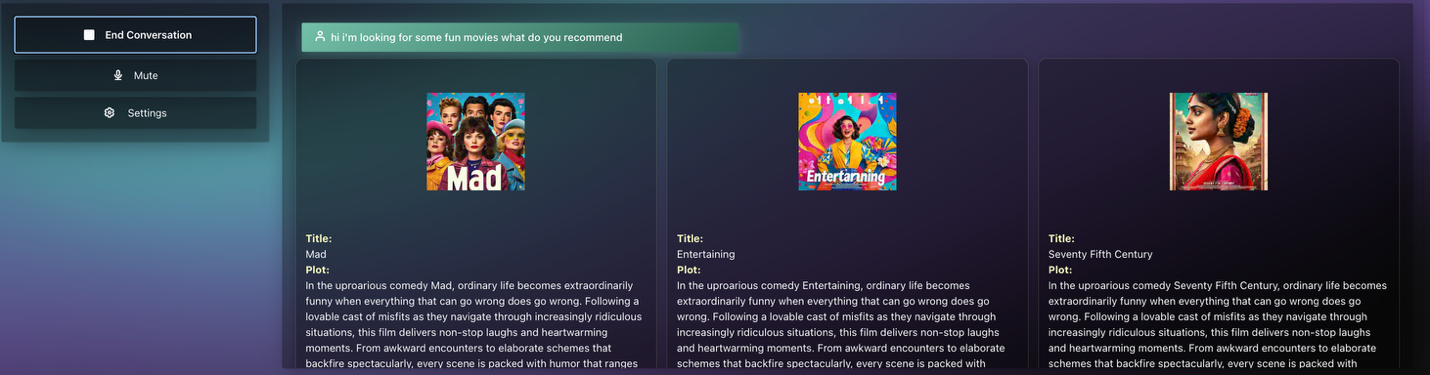
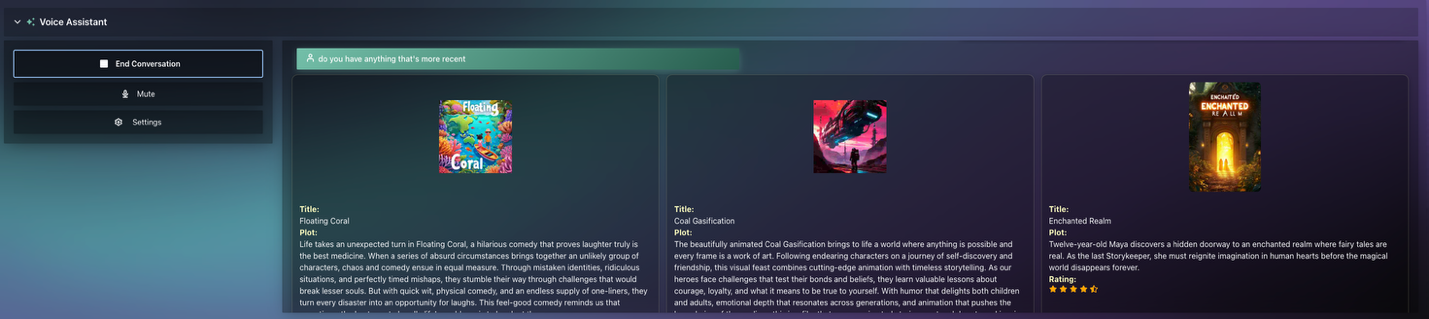
The results from the sample search query returned 30 relevant movies. Finally, we use the Amazon Rerank model to re-rank the recommended movies based on the search results and the rewritten user query to return the top three most relevant movies. This process repeats throughout the user session, with the conversation history being part of the context to the previous LLM chain to further help enrich the user experience. Here’s a screenshot of an example for a movie recommendation query:
General recommendation request
Q: “I am looking for some fun movies, what do you recommend?”
Q: “Do you have something more recent?”
Direct Movie Search
Q: “I am looking for a movie called ‘Tears of Steel’, do you have this movie?”
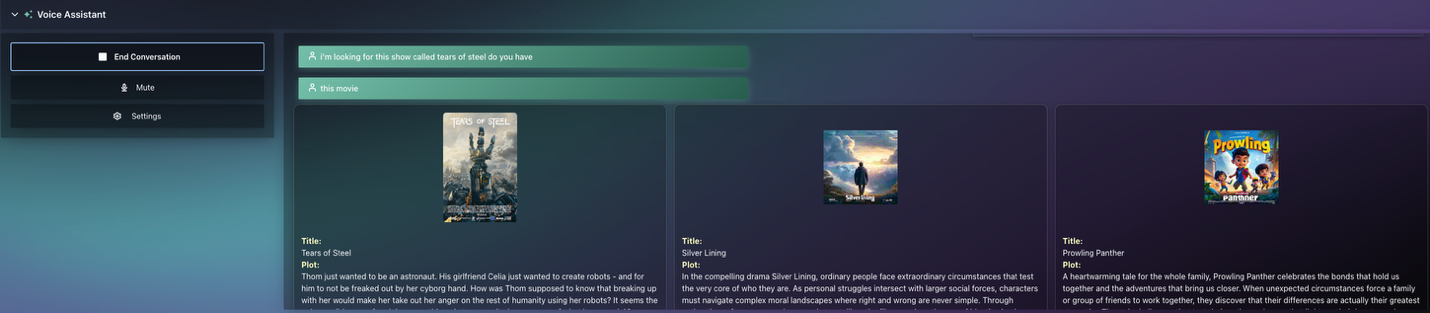
Movie scene analysis flow
Like the recommendation flow, here we outline a scene analysis workflow enabled through the same components. Imagine you had to take a break and missed a few minutes of your favorite show, this assistant will provide you with a summary. It can also provide you with a detailed analysis of a scene, including the actors and what’s happening in the scene.
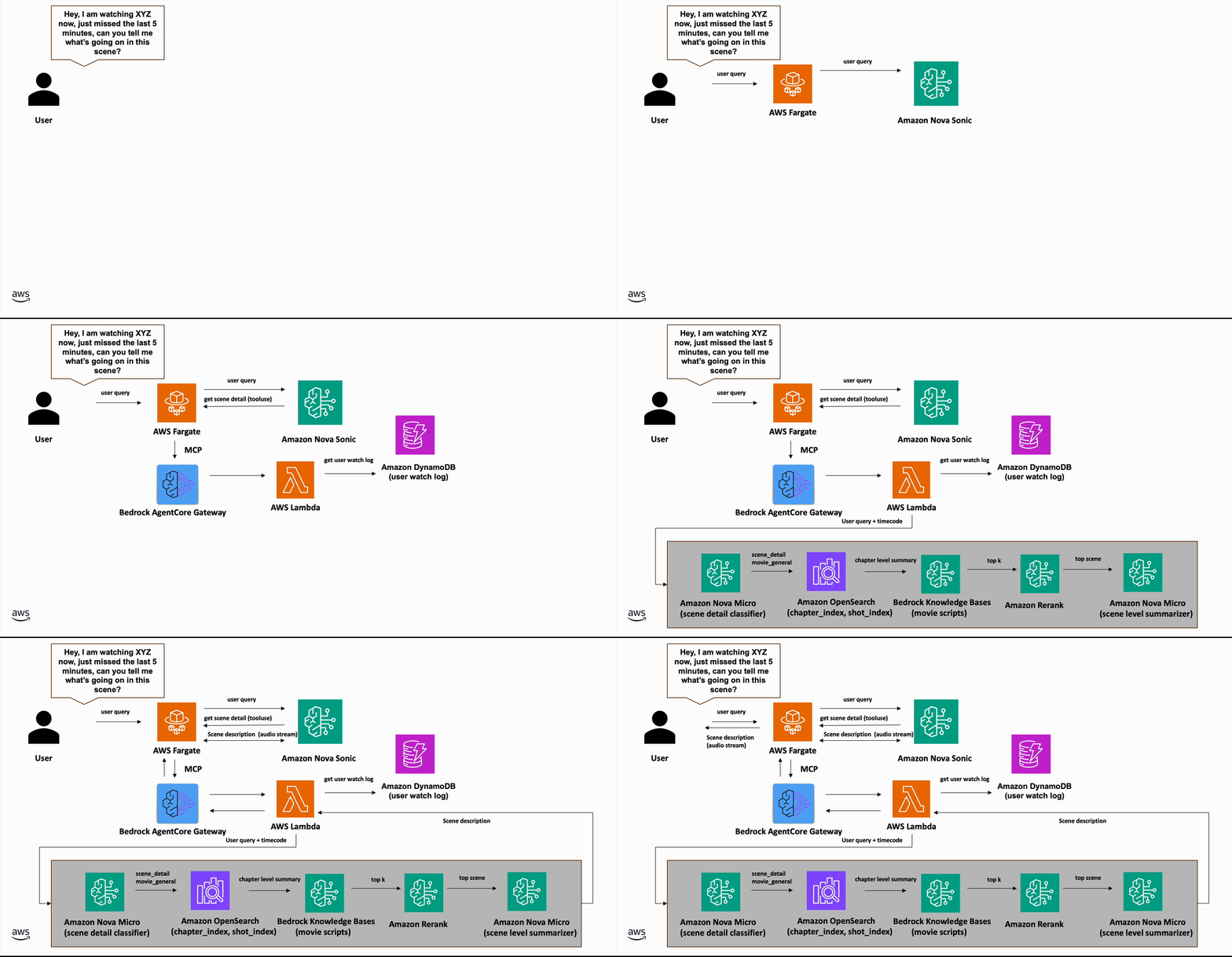
When a user pauses the movie to ask a question, the application captures the relevant metadata such as the current timecode and movie title, then stores this information in an Amazon DynamoDB table for later use. For example, if the user asks, “Can you tell me what’s happening in this scene?”, the application references the user watch log to locate the latest state and the movie they are watching. The scene analysis is handled by a tool triggered by Amazon Nova Sonic based on the contextual understanding of the user dialog. We process the scene analysis request in multiple LLM calls chained in a sequence. First, we use Amazon Nova Micro with a prompt to classify the intent of the scene analysis based on the user query. The prompt used for this task can be found in the movieScene_classfier function in the movie scene assistant module.
Based on the intent classification functionality, we trigger the appropriate workflow to process scene details. For this section, let’s focus on the scene level detail. Using the retrieved user watch log, we extract the chapter summary, transcription, and known celebrities matching the given timecodes. The movie insights including scene detail and movie scripts, are processed using Amazon Bedrock Data Automation and stored in an Amazon OpenSearch Serverless collection for semantic search and filters. We optionally include previous chapter information when the user watch log is situated at the beginning of a chapter so that we can provide better context to help enrich the scene analysis. Next, we use the extracted scene details to find the most semantically similar segments from the movie script and use the script detail to provide the enriched scene understanding. To demonstrate this process, let’s consider a scene extracted between 5:15-5:40 from “Tears of Steel” as follows:
Based on the insights generated by Amazon Bedrock Data Automation, the chapter summary for the previous scene is shown as follows:
In a historic European city, a large robot crashes through rooftops, causing destruction. A man with a cybernetic eye watches the robot’s movements from a balcony. He communicates with someone off-screen, saying “Get her to come in” and “2 minutes left.” He then urges, “Speed it up, bud,” indicating a time-sensitive operation. Another man with a rifle appears, positioned to engage the robot. The scene shows a military or tactical operation in progress, with the robot as the primary threat. The cybernetic-eyed man monitors a countdown timer, suggesting they are preparing for a confrontation with the robot.\n[spk_0]: Get her to come in. 2 minutes left. 2 minutes. Speed it up, bud.
Using the previous scene summary, we perform a semantic search against the Amazon OpenSearch index managed by Amazon Bedrock Knowledge Bases. The data source contains the movie script preprocessed with a chunk size of 300 tokens coupled with 10% overlap. We re-rank the retrieved documents using the Amazon Rerank model to select the top segment to be used as the final representation of the scene description. Here’s a sample script segment derived from the reranking process:
It looks around and then spots Barley in the tower. BARLEY: (Into radio) OK, they’re coming. Two minutes left! 14. INT. CHURCH/BUNKER. MORNING The director listening to Barley over his radio. BARLEY: (CONT.) (Through radio) Two minutes. DIRECTOR: (Through radio to loudspeaker) Speed it up Thom! Vivacissimo! 15. EXT. STREET. DAY The recreation of Thom and Celia’s breakup resumes, Celia is now more threatening than she was originally, no longer upset so much as intimidating. CELIA: Why don’t you just admit that you’re freaked out by my robot hand? More words appear in the sky for Thom to read “Celia, I love your robot hand”, although he decides to ignore them. 6. THOM: Listen, Celia, I was young. But that’s no reason to destroy the world. Celia continues to stare menacingly at Thom, opening and closing her robotic hand. 16. INT. CHURCH/BUNKER. MORNING Director and Assistant in office as they watch the scene unfold. ASSISTANT: Why does he do this? DIRECTOR: We already tried that one! 17. EXT. STREET. DAY.’
Finally, we use Amazon Nova Micro to summarize the previous scene information. The response is transformed to natural speech by Amazon Nova Sonic and streams back to the user to complete the interaction. Here’s the final narrative produced by Amazon Nova Sonic:
In this scene, Barley is counting down the seconds from atop a tower, creating a sense of urgency. Below, in a bunker, the director is giving orders to speed up the action. On the street, Thom and Celia are facing each other with tension. Celia has a menacing robotic hand, and Thom admits his past mistakes. The director and his assistant are watching the scene unfold, with the director remaining focused despite the assistant’s confusion.
Here’s an end-to-end walkthrough of the solution presented at IBC2025, a leading annual trade show for professionals in the media, entertainment, and technology sectors.
Conclusion
In this post, we showcased a conversational AI agent that understands and responds in natural voice interaction to help users discover movies and TV shows in a personalized way, while providing real-time insights during viewing. The system analyzes the users’ individual viewing patterns and the watch history to create personalized profiles that drive relevant recommendations. For example, a user who watches a lot of action movies can receive action related movie recommendations when asked a generic theme question like “fun movies”. You can interact with the AI through voice commands to receive tailored content suggestions, access detailed information about actors, and get instant explanations about specific scenes in movies you’re currently watching. The solution showcases the ability of Nova Sonic 2.0 to understand natural language, perform semantic knowledge base searches, manage playlists, and maintain context throughout multi-turn conversations. This approach represents a significant leap forward from implicit feedback-based recommendations to explicit, conversational preference gathering. This ultimately helps to create a more engaging and intuitive content discovery experience that can drive higher user engagement and service retention.
Acknowledgement
This post is the product of a fantastic collaborative effort. Huge thanks to Arturo Velasco, Daryl Cartwright, George Vasels, Juan Andres Caycedo, and Vince Palazzo for pouring their time and expertise into the blog, demo, and code samples. This wouldn’t exist without them.
About the authors
from Artificial Intelligence https://ift.tt/nyF4j9S